
IP Addressing Scheme
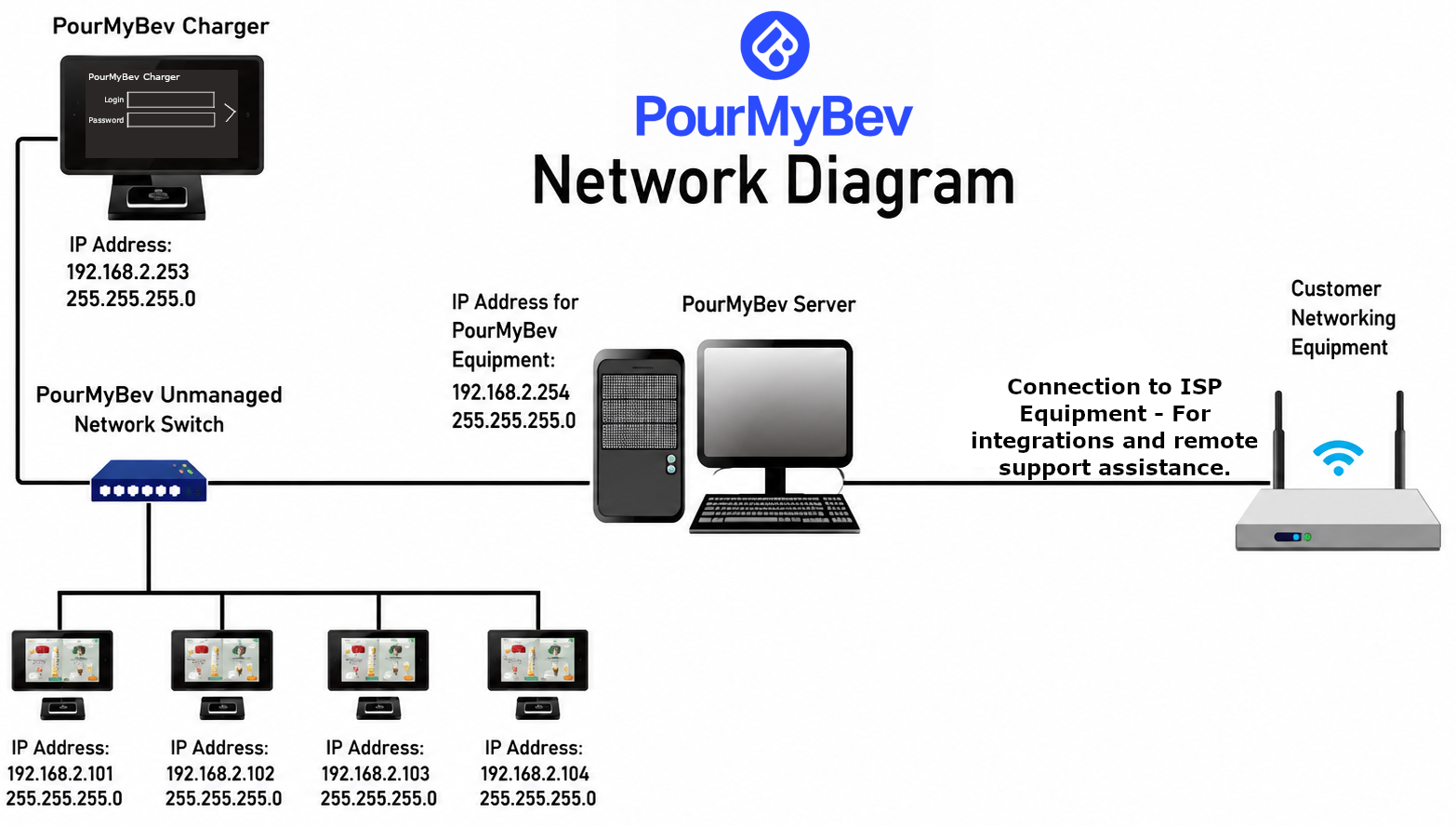
PourMyBev operates on the following private IPv4 subnet:
Network: 192.168.2.0/24
Subnet Mask: 255.255.255.0
Reserve the following address range exclusively for PourMyBev devices:
192.168.2.101 – 192.168.2.254
Static Device Assignments
|
Device |
IP Address |
|
PourMyBev Server |
192.168.2.254 |
|
Charger #1 |
192.168.2.253 |
|
Charger #2 |
192.168.2.252 |
|
Additional Chargers |
Continue counting downward |
|
UI Screen Clients |
Begin at 192.168.2.101 and increment upward |
No non-PourMyBev devices should use IP addresses within this reserved range.
Note: This does not have to be 192.168.2.0/24. It can be a 10.x, 172.16.x to 172.31.x, or any 192.168.x IP space that you have. For example, in my home lab I use 192.168.10.0/24 for my PMB network.
Firewall & Whitelisting Requirements
The following outbound and inbound rules must be permitted by the firewall.
|
Source |
Destination |
Port(s) |
Protocol |
Direction |
Purpose |
|
PourMyBev Server |
Internet |
80, 443 |
TCP / UDP |
Outbound |
General internet connectivity |
|
PourMyBev Server |
master*.teamviewer.com router*.teamviewer.com |
5938, 443, 80 |
TCP / UDP |
Outbound |
TeamViewer remote support |
|
PourMyBev Server |
ftp.ventive.app |
20, 21, 22 |
TCP |
Inbound / Outbound |
POS integration, file transfers, automated upgrades |
|
PourMyBev Server |
pmb-admin.azurewebsites.net 40.122.110.154 |
80, 443 |
TCP |
Inbound / Outbound |
POS monitoring and support |
|
PourMyBev Server |
pmbapi.ventive.app |
9200 |
TCP |
Outbound |
ElasticSearch cloud backup for POS integration |
|
PourMyBev Server |
bkg.pourmybeer.com bkg.isogentdev.com |
80, 443 |
TCP |
Outbound |
Reporting portal |
|
PourMyBev Server |
smtp.gmail.com |
465 |
TCP |
Outbound |
Optional keg management email alerts |
|
PourMyBev Server |
business.untappd.com |
80, 443 |
TCP |
Outbound |
Untappd Business integration |
Wired Network Requirements
The PourMyBev system operates on its own dedicated Local Area Network (LAN).
Prior to installation, provide the following Category 6 Ethernet cabling.
|
Connection |
Quantity |
|
Switch → Each Beer Screen |
One per screen |
|
Switch → Each Check-In Station (Charger) |
One per charger |
|
Switch → PourMyBev Server |
One |
|
Customer Router → PourMyBev Server |
One |
Cabling Standards
All network cabling must:
- Be Category 6 or better
- Be terminated using TIA/EIA-568B
- Use RJ45 male connectors
- Be fully tested before installation
- Be permanently labeled
If a patch panel is used, the customer is responsible for all patch panel connections between the panel and every PourMyBev device.
Dedicated Network Requirements
Preferred Deployment
PourMyBev strongly recommends deploying the entire system on a physically isolated LAN.
The following devices should reside on the same dedicated network:
- PourMyBev Server
- UI Screen Clients
- Chargers
- Network Switch
No unrelated customer devices should share this network.
VLAN Deployment
If a dedicated physical LAN is not available, a dedicated VLAN is acceptable.
The VLAN must meet the following requirements:
-
- Dedicated exclusively to PourMyBev equipment
- Use the 192.168.2.0/24 subnet
- Reserve addresses 192.168.2.101-254
- Provide one Ethernet switch port for every PourMyBev device
- Prevent non-PourMyBev devices from joining the VLAN
Note: This does not have to be 192.168.2.0/24. It can be a 10.x, 172.16.x to 172.31.x, or any 192.168.x IP space that you have. For example, in my home lab I use 192.168.10.0/24 for my PMB network.
Layer 2 Bridging for Multi-Building Installations
Large campuses such as resorts, stadiums, hotels, and country clubs often require PourMyBev devices to operate across multiple buildings while remaining on the same Layer 2 network.
Layer 2 tunneling technologies allow geographically separated Ethernet networks to function as a single broadcast domain by preserving:
- MAC addresses
- DHCP broadcasts
- Layer 2 discovery protocols
- Non-routable traffic
Unlike traditional Layer 3 VPNs, Layer 2 bridging extends the Ethernet segment rather than routing between separate subnets.
Supported Technologies
Common Layer 2 tunneling solutions include:
|
Platform |
Technology |
|
MikroTik |
EoIP |
|
Cisco |
L2TPv3 |
|
pfSense / OPNsense |
OpenVPN TAP Bridge. OpnSense & pfSense can easily be installed on a dual 2.5Gbit ethernet mini-pc and configured in under 10-15 minutes. |
|
WireGuard/IPsec |
Used to encrypt Layer 2 tunnels |
|
Other Vendors |
Many managed switches and routers provide equivalent Layer 2 bridging capabilities in addition to built in VPN capabilities. |
Important: EoIP is not encrypted. When deployed over public networks, it should always operate within an encrypted VPN such as IPsec or WireGuard, however you decide to configure this.
Wireless Point-to-Point (PtP) & Point-to-Multipoint (PtMP) Bridging
When trenching Ethernet or fiber between buildings is impractical or cost-prohibitive, a dedicated wireless bridge may be used to extend the PourMyBev network between locations.
Unlike standard Wi-Fi, wireless bridge systems create a transparent Layer 2 Ethernet link between two or more buildings, allowing the remote PourMyBev equipment to operate as though it were directly connected to the local network.
Recommended Use Cases
Wireless bridging is commonly used for:
- Country clubs
- Resorts
- Golf courses
- Stadiums
- Outdoor venues
- Multiple buildings on the same property
- Temporary installations or event spaces
Deployment Requirements
To ensure reliable operation, wireless bridges should meet the following recommendations:
- Dedicated point-to-point (PtP) or point-to-multipoint (PtMP) bridge equipment
- Clear line-of-sight (LoS) between bridge locations
- Gigabit Ethernet interfaces
- Stable throughput of at least 100+ Mbps in both directions
- Low latency (typically less than 5 ms)
- WPA2/WPA3 or equivalent encrypted wireless links
- Surge protection and proper grounding for outdoor installations
- Weather-rated equipment suitable for the deployment environment
Recommended Vendors
The following enterprise-grade wireless bridge manufacturers are commonly deployed in commercial environments:
|
Vendor |
Typical Products |
|
Ubiquiti |
airMAX, airFiber, NanoBeam, PowerBeam, LiteBeam |
|
MikroTik |
Wireless Wire, Cube, LHG Series |
|
Cambium Networks |
ePMP, PTP Series |
|
TP-Link Omada |
Omada Outdoor Bridge Series |
|
EnGenius |
EnStation and EnJet Series |
Warning: Consumer-grade Wi-Fi extenders, mesh systems, or wireless repeaters are not recommended for PourMyBev deployments. These devices typically introduce additional latency, reduce available bandwidth, and may not reliably forward Layer 2 traffic required for optimal system operation.
Best Practices
- Whenever possible, configure the wireless bridge as a transparent Layer 2 Ethernet bridge rather than routing traffic between separate subnets.
- Reserve wireless bandwidth exclusively for operational traffic and avoid sharing the bridge with guest internet access or high-bandwidth applications.
- If Quality of Service (QoS) is available, prioritize PourMyBev traffic across the wireless link.
- Verify signal strength, link quality, and throughput before scheduling the PourMyBev installation.
Wireless Layer 2 bridges may also be used in conjunction with EoIP, L2TPv3, or other Layer 2 tunneling technologies when extending the PourMyBev network across larger campuses or locations with complex network topologies.
Internet Requirements
The PourMyBev Server requires a dedicated wired Ethernet connection with reliable internet access. This allows the PourMyBev technical support team to render assistance when needed, provide snappy reliable software upgrades, and if using one of our many integrations it allows ample bandwidth for reliability and performance.
Minimum recommended internet service:
- 100 Mbps download
- 100 Mbps upload
Recommended best practices:
- Prioritize PourMyBev traffic using Quality of Service (QoS).
- Limit guest Wi-Fi bandwidth to prevent saturation during peak business hours.
- Deploy a secondary ISP for automatic failover in high-volume locations whenever possible if you are in an area with spotty/unreliable ISP's or old buildings with dated cable runs.
Self-Managed / MSP Network Readiness Checklist
Before scheduling installation, verify the following requirements.
Cabling
|
Requirement |
Complete |
|
All cabling is Cat6 or better |
☐ |
|
All terminations follow TIA/EIA-568B |
☐ |
|
Every device has a dedicated Ethernet drop |
☐ |
|
All cables are labeled |
☐ |
|
All cables have been tested |
☐ |
|
Dedicated Ethernet connection available for the PourMyBev network |
☐ |
Internet
|
Requirement |
Complete |
|
Minimum 100 Mbps download |
☐ |
|
Minimum 100 Mbps upload |
☐ |
IP Addressing
|
Requirement |
Complete |
|
192.168.2.101–254 reserved for PourMyBev |
☐ |
|
Alternative addressing communicated to the PourMyBev Installation Coordinator |
☐ |
Firewall
|
Requirement |
Complete |
|
Outbound ports 80 and 443 permitted |
☐ |
|
Outbound ports 465, 5938, and 9200 permitted |
☐ |
|
Ports 20, 21, and 22 permitted as required for POS integration |
☐ |