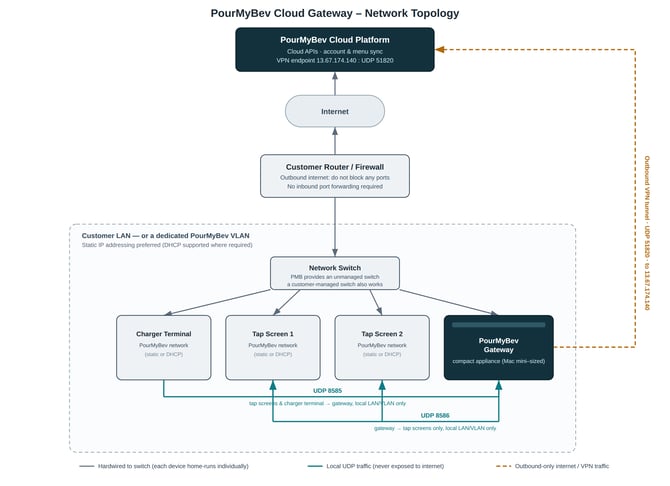
Network Diagram (internet direct to unmanaged switch):
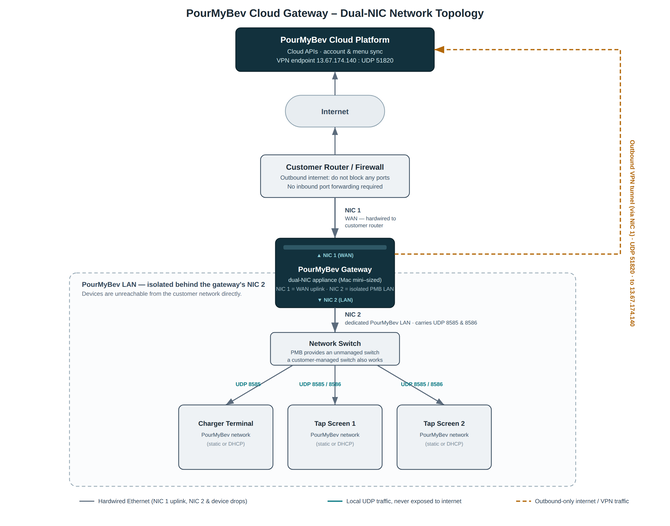
Network Diagram (dual NIC configuration):
Local UDP traffic stays on your LAN or VLAN, and all cloud traffic leaves the gateway outbound only
Deployment Options
The gateway supports two network setups:
- A dedicated PourMyBev LAN or VLAN, separate from other traffic on your network.
- Your existing customer-managed network.
Choose the setup for your site. A dedicated VLAN isolates PourMyBev traffic and simplifies troubleshooting down the line.
Dual-NIC Gateway Option
Sites that need hard isolation between PourMyBev devices and the rest of the customer network can order the gateway in a dual-NIC configuration. Figure 2 shows the layout.
- NIC 1 (WAN) hardwires to the customer router. This link carries outbound internet and cloud/VPN traffic only.
- NIC 2 (LAN) hardwires to the dedicated PourMyBev switch. This link carries only local UDP traffic (8585 and 8586) to and from your tap screens and charger terminals.
- With this configuration, the PourMyBev LAN has no path to the customer network except through the gateway. Devices are not reachable from the customer network directly.
IP Addressing
- Static addressing is preferred. Static IPs keep assignments predictable and simplify support calls.
- DHCP works too, in networks where a static setup is not practical.
- Send your PMB Project Manager the gateway's planned IP address, subnet, and DNS servers before install. Do this early if your organization runs a strict firewall or whitelist policy.
Example static IP scheme:
Network: 192.168.2.0/24
Subnet Mask: 255.255.255.0
If possible, reserve the following address range exclusively for PourMyBev devices:
192.168.2.101 – 192.168.2.254
Static Device Assignments
|
Device |
IP Address |
|
PourMyBev Gateway |
192.168.2.254 |
|
Charger #1 |
192.168.2.253 |
|
Charger #2 |
192.168.2.252 |
|
Additional Chargers |
Continue counting downward |
|
UI Screen Clients |
Begin at 192.168.2.101 and increment upward |
Non-PourMyBev devices should not use IP addresses within this reserved range.
VLAN Deployment
If a dedicated physical LAN is not available, a dedicated VLAN is acceptable.
The VLAN must meet the following requirements:
-
- Dedicated exclusively to PourMyBev equipment
- Use the 192.168.2.0/24 subnet
- Reserve addresses 192.168.2.101-254
- Provide one Ethernet switch port for every PourMyBev device
- Prevent non-PourMyBev devices from joining the VLAN
Note: This does not have to be 192.168.2.0/24. It can be a 10.x, 172.16.x to 172.31.x, or any 192.168.x IP space that you have. For example, in my home lab I use 192.168.10.0/24 for my PMB network.
Local Device Communication (LAN/VLAN Only)
The gateway talks to your PourMyBev devices over UDP on the local network. Configure your firewall and VLAN access rules to allow this traffic between PourMyBev devices.
|
Port |
Direction |
Notes |
|
UDP 8585 |
Devices → Gateway |
Opened and monitored by the gateway's initGW script. Inbound from the PourMyBev private network to the gateway. |
|
UDP 8586 |
Gateway → Displays |
Monitored by the gateway for traffic outbound to your displays. |
|
Keep UDP 8585 and UDP 8586 on the local network. Never expose either port to the public internet. |
Internet and Cloud Connectivity
The gateway needs a reliable, outbound internet connection to reach the PourMyBev cloud platform.
- Leave every outbound port on your router open. Do not block outbound traffic from the gateway.
- Allow outbound VPN traffic to our public IP address, 13.67.174.140, on UDP port 51820. The gateway uses this connection to reach PourMyBev's cloud services.
- Skip inbound port forwarding. The gateway starts every connection itself, so your router does not need any inbound rules pointed at the gateway.
Wired Network Requirements
The PourMyBev system operates on its own dedicated Local Area Network (LAN).
Prior to installation, provide the following Category 6 Ethernet cabling.
|
Connection |
Quantity |
|
Switch → Each Beer Screen |
One per screen |
|
Switch → Each Check-In Station (Charger) |
One per charger |
|
Switch → PourMyBev Gateway |
One |
|
Switch → Internet |
|
Cabling Standards
All network cabling must:
- Be Category 6 or better
- Be terminated using TIA/EIA-568B
- Use RJ45 male connectors
- Be fully tested before installation
- Be permanently labeled
If a patch panel is used, the customer is responsible for all patch panel connections between the panel and every PourMyBev device.
Dedicated Network Requirements
Preferred Deployment
PourMyBev strongly recommends deploying the entire system on a physically isolated LAN.
The following devices should reside on the same dedicated network:
- PourMyBev Gateway
- UI Screen Clients
- Chargers
- Network Switch
No unrelated customer devices should share this network.
The PourMyBev Server requires a dedicated wired Ethernet connection with reliable internet access. This allows the PourMyBev technical support team to render assistance when needed, provide snappy reliable software upgrades, and if using one of our many integrations it allows ample bandwidth for reliability and performance.
Minimum recommended internet service:
- 100 Mbps download
- 100 Mbps upload
Recommended best practices:
- Prioritize PourMyBev traffic using Quality of Service (QoS).
- Limit guest Wi-Fi bandwidth to prevent saturation during peak business hours.
- Deploy a secondary ISP for automatic failover in high-volume locations whenever possible if you are in an area with spotty/unreliable ISP's or old buildings with dated cable runs.
Pre-Installation Checklist
- Network cabling meets Category 6 (or better) standards, tested and labeled.
- Every PourMyBev device and the gateway has a dedicated network drop.
- Deployment model is decided: dedicated PourMyBev LAN/VLAN or customer-managed network.
- Gateway IP addressing is set: static (preferred) or DHCP.
- Firewall and VLAN rules allow local UDP traffic (ports 8585 and 8586) between PourMyBev devices.
- UDP 8585 and UDP 8586 stay off the public internet.
- Outbound internet access is open on your router; no ports blocked.
- Outbound UDP 51820 is allowed to 13.67.174.140.
- No inbound port forwarding is configured for the gateway.
- Strict firewall or whitelist sites have shared their subnet, gateway IP, DNS, and allow-list with their installation coordinator.
Before scheduling installation, verify the following requirements.
Cabling
|
Requirement |
Complete |
|
Network cabling meets Category 6 (or better) standards, tested and labeled. |
☐ |
|
All terminations follow TIA/EIA-568B |
☐ |
|
Every PourMyBev device and the gateway has a dedicated network drop. |
☐ |
| Deployment model is decided: dedicated PourMyBev LAN/VLAN or customer-managed network |
☐ |
|
Gateway IP addressing is set: static (preferred) or DHCP |
☐ |
| Firewall and VLAN rules allow local UDP traffic (ports 8585 and 8586) between PourMyBev devices |
☐ |
| UDP 8585 and UDP 8586 stay off the public internet |
☐ |
| Outbound internet access is open on your router; no ports blocked |
☐ |
| Outbound UDP 51820 is allowed to 13.67.174.140 |
☐ |
| No inbound port forwarding is configured for the gateway |
☐ |
| Strict firewall or whitelist sites have shared their subnet, gateway IP, DNS, and allow-list with their installation coordinator |
☐ |
Internet
|
Requirement |
Complete |
|
Minimum 100 Mbps download |
☐ |
|
Minimum 100 Mbps upload |
☐ |